
I am midway during exam season (two weeks) long and things seems to be going swimmingly which I'm happy to report.
Over the past two weeks I've just spent some time tidying up the code and trying to fix a pretty nasty crash in QGraphicsview, anytime you updated the view. I really hope this has gone, but if during testing you suddenly experience a crash when the view updates, please inform me. It seems to have disappeared but esentially was a problem with incorrect bounding boxes as the usual case is. Additionally I've just tidyied up the code and improved the performance by having QGraphicsView using a backend cache, so it doesn't have to constantly redraw features when it is unecessary.
Today, I decided to have a day off revision, as to be honest I am fed up with the mundane repetitiveness. Apart from what I mentioned earlier I wanted to take a quick diversion from the orthographic project stuff I've recently been looking at which I've also made a few improvements on.
I wanted to take a look back at sectional views which I had to give up on because I couldn't correctly produce faces by processing each edges in the correct order. I mentioned this in a previous blog entry some time ago.
Eventually I managed to find the problem and unexpectedly half of the result was from the drawing code itself, where although the edges were in the correct order there was a chance these could be reversed. Eventually I got something working on most faces.
I then updated the work on the sectional view and behold...

This was taken from a simple planar cut through straight through the centre:

To be honest it's only a proof of concept that i've created over the past few hours. I have identified that some changes are needed to improve the structure to something less 'hacky'. The other limitation is there won't be use of 'true' dimensions because references are lost when the boolean cut is applied.
----------- UPDATE ---------
We all like updates. Spent this evening on it again, rather naughtily and tidied up the areas that I weren't happy with. The section plane is now it's own object in the drawing view, so I had to build up some infrastructure around there which I am more happy with. Now we can finally get some sectioning goodness!

I need to fix a bug that's causing a segfault, so hopefully soon I can push this for people to try and experiment with probably more complicated shapes.
Over the past two weeks I've just spent some time tidying up the code and trying to fix a pretty nasty crash in QGraphicsview, anytime you updated the view. I really hope this has gone, but if during testing you suddenly experience a crash when the view updates, please inform me. It seems to have disappeared but esentially was a problem with incorrect bounding boxes as the usual case is. Additionally I've just tidyied up the code and improved the performance by having QGraphicsView using a backend cache, so it doesn't have to constantly redraw features when it is unecessary.
Today, I decided to have a day off revision, as to be honest I am fed up with the mundane repetitiveness. Apart from what I mentioned earlier I wanted to take a quick diversion from the orthographic project stuff I've recently been looking at which I've also made a few improvements on.
I wanted to take a look back at sectional views which I had to give up on because I couldn't correctly produce faces by processing each edges in the correct order. I mentioned this in a previous blog entry some time ago.
Eventually I managed to find the problem and unexpectedly half of the result was from the drawing code itself, where although the edges were in the correct order there was a chance these could be reversed. Eventually I got something working on most faces.
I then updated the work on the sectional view and behold...
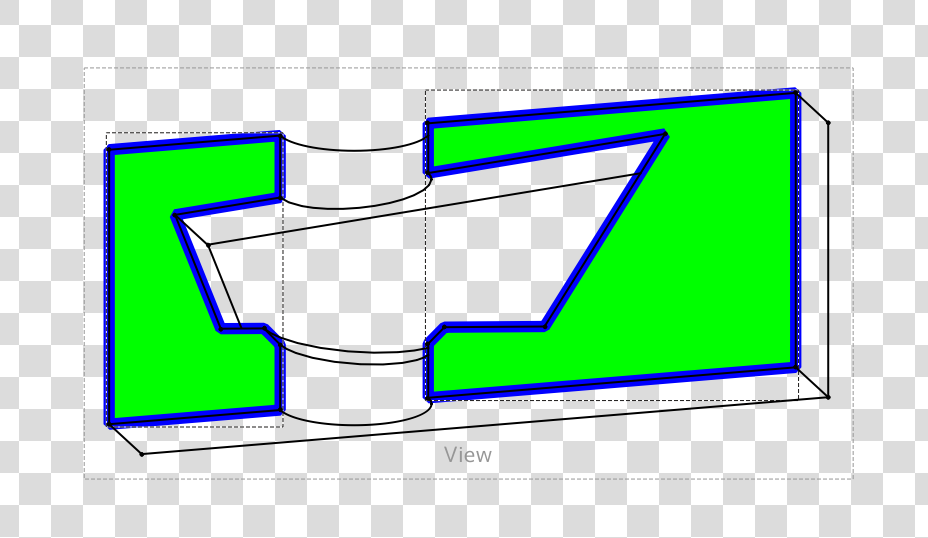
This was taken from a simple planar cut through straight through the centre:

To be honest it's only a proof of concept that i've created over the past few hours. I have identified that some changes are needed to improve the structure to something less 'hacky'. The other limitation is there won't be use of 'true' dimensions because references are lost when the boolean cut is applied.
----------- UPDATE ---------
We all like updates. Spent this evening on it again, rather naughtily and tidied up the areas that I weren't happy with. The section plane is now it's own object in the drawing view, so I had to build up some infrastructure around there which I am more happy with. Now we can finally get some sectioning goodness!
I need to fix a bug that's causing a segfault, so hopefully soon I can push this for people to try and experiment with probably more complicated shapes.


